Posts

Delayed Push Notification Service for Windows Phone

Image
This is a multi part blog post the other posts in this series are: Overview – you’re reading this now. The push notification service – how to implement the delayed push notification service The client library – not yet written. In this post I discuss push notifications, and share my web service which implements a delayed push notification. Push notifications are a web service that MS provides that can send a message to the phone. There are 3 flavors of push notifications: Raw notification: Raw bytes - ignored if your app isn't running, sent to your app if it's running.  Tile notification: Manipulate application tile, worth it's own blog post.  Toast notifications: If your app isn't running pop up a toast giving a message to the user.  An interesting detail about the push notification web service is how the web service is addressed, and how the phone is identified. I'd expected something like this: But instead you get the more elegant: // doesn't wor...

The Scunthorpe problem

I ran across an obscure reference to Scunthorpe problem and had to investigate what this “problem” is.  It turns out Scunthorpe is a town in England, as are the following towns which share the same problem: Penistone , Lightwater . No idea? Perhaps this interview question will make it clear: Design a simple system that can determine if a user name is obscene.

Facebook, OpenID and Decrypting SSL

Image
I was excited to see Facebook (FB) supporting login via OpenID (FB is a relying party), and I decided to give it a whirl. Here I list the results of my investigation, which describe the odd use of OpenID, as well as my wire level analysis which I hope you find informative. This post doesn't go into details of how OpenID works, if you're interested in that leave a comment and I'll put up such a post. FB uses OpenID in a way I've never seen before. In the "common" OpenID login model, you get a login page that shows you some sort of login via OpenID buttons. When you go to the FB login page there is no login via OpenID.   This confused me, but I went to my FB account settings and linked my google account to my FB account. (Attempts to link my MyOpenID account failed with a strange error message).  After some trial and error I realized that if I was logged into my Google account and went to the FB page than I'd automatically get logged into FB. Debugging...

Taskmgr to PowerShell: Kill A Process

You know the drill, some app freezes. You try to close it, that doesn’t work.  You fire up taskmgr, sort by name, type in the name, and then hit the delete key to kill the process.  Easy with powershell: Get-Process | ? {$_.Name -eq "firefox"} | kill The real power here is the composability of powershell, for example you could also debug the process. Get-Process | ? {$_.Name -eq "firefox"} | Debug-Process Or if you’re not sure what’s going to happen you can always pass the –whatif qualifier: PS C:\Users\igord\Downloads> Get-Process | ? {$_.Name -eq "firefox"} | Debug-Process -whatif What if: Performing operation "Debug-Process" on Target "firefox (8204)" Happy Powershelling

Powershell: Returning ScriptBlocks and Closures

Powershell lets you return scriptblocks (aka anonymous functions) from functions, for example: function generateAdder ($n) { { param ($x) $n+$x } } PS C:\> $add4 = generateAdder 4 PS C:\> & $add4 7 7 If you've used languages with closures you'd have expected to get back a function that adds 4 to a passed in value. You'd expect that because $n=4 was in lexical scope when we created the scriptblock to be returned. Recall powershell is dynamically scoped so we don't need to bind ($n) to a lexcial location, instead we can pick up $n from our current environment: PS C:\> $n = "Hello" PS C:\> & $add4 7 Hello7 What if you want to instantiate a closure with powershell instead? Luckily someone thought of that and you can do: function generateAdder2 ($n) { { param ($x) $n+$x }.GetNewClosure() } PS C:\> $add4 = generateAdder2 4 PS C:\> & $add4 7 11 Leave a comment if you use th...

Batch to Powershell: dir /s

I often go looking for a file in batch, aka c:\Program Files (x86)>dir /s fsi* Volume in drive C has no label. Volume Serial Number is 8EDE-D64E Directory of c:\Program Files (x86)\Microsoft F#\v4.0 03/19/2010 02:02 PM 230,216 Fsi.exe 09/30/2009 08:08 PM 158 Fsi.exe.config 2 File(s) 230,374 bytes Unfortunately this doesn't 'just work' in powershell. A quick search on the internet shows in powershell 'dir /s' becomes 'dir -r', but the following doesn't work either: PS C:\Program Files (x86)> dir -r fsi* PS C:\Program Files (x86)> What's going on? Let's check the help: PS C:\Program Files (x86)> help dir NAME Get-ChildItem SYNOPSIS Gets the items and child items in one or more specified locations. SYNTAX Get-ChildItem [[-Path] ] [[-Filter] ] [-Exclude ] [-For ce] [-Include ] [-Name] [-Recurse] [-UseTransaction] [ ] Get-ChildItem...

F# Tricks: Concise BoolToInt

As a C# programmer, you'd probably write BoolToInt as follows in F#: let boolToInt3 b = if b = true then 1 elif b = false 0 Not a big win over C# yet, but a few things to point out about the concise syntax: Indentation implies blocks. There is no 'return' keyword. This function is statically typed, you don't see types since the compiler infers the types. As a novice F# programmer a trick you learn is pattern matching. Pattern matching is like a case statement, but it's an expression and it's really powerful. I'll go into more details on pattern matching in future posts. For now, notice the elegance of the below: let boolToInt2 b = match b with | true -> 1 | false -> 0 Pattern matching is so useful to F# there is a syntax for creating a function of one parameter that only pattern matches, using that syntax, we define boolToInt in the final form of: let boolToInt3 = function | true -> 1 | false ->...

The power of shift clicking – Copy As Path

Image
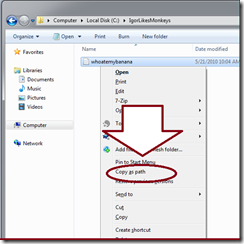
  Have you ever been in explorer and needed to get the path of a file? Turns out that feature is built into Windows 7! If you shift right click on a file, the menu contains a copy as path link.  Sweet!

The joy's of batch - Delayed Expansion

  If you can, skip batch and move strait to powershell. If you don't believe me, maybe this blog post will change your mind. In batch %ErrorLevel% is how you know if the last command succeeded: C:\>echo %ERRORLEVEL% 0 It turns out if you set a variable that doesn't exist, this sets error code to 1. So C:\>set DONKEYRIDING Environment variable DONKEYRIDING not defined C:\>echo %ERRORLEVEL% 1 Makes sense, batch isn't that bad you think. Now here's a pop quiz - What will you get when you run this batch file? C:\>type foo.bat if NOT "BATCH"=="OBVIOUS" ( echo %ERRORLEVEL% set DONKEYRIDING echo %ERRORLEVEL% ) I"ll run it for you: C:\>foo.bat C:\>if NOT "BATCH" == "OBVIOUS" ( echo 0 set DONKEYRIDING echo 0 ) 0 Environment variable DONKEYRIDING not defined 0 C:\> Not what you thunk huh? Maybe error level wasn't set - lets check C:\>echo %ERRORLEVEL% 1 What the...

Better Certificate Management in Powershell via CertificateHelper

If you’ve read my previous post here , you know powershell can do some basic certificate management via the certificate provider. However, the certificate provider has some limitations. The certificate provider can’t create,delete,copy or import/export certificates. This annoyed me so I’m creating a powershell module called CertificateHelper that will provide these missing features. So far the module implements: New-Certificate Remove-Certificate  CertHelper can be found on codeplex . You install it like this: (You must have hg installed) PS C:\>cd $home\Documents\WindowsPowerShell\Modules PS C:\Users\igord\Documents\WindowsPowerShell\Modules> hg clone https://hg01.codeplex.com/certificatehelper destination directory: certificatehelper requesting all changes adding changesets adding manifests adding file changes added 5 changesets with 8 changes to 4 files updating to branch default 4 files updated, 0 files merged, 0 files removed, 0 files unresol...

Using tshark to find the man in the middle

This post is targeted at people that understand ip addresses, default gateways and have heard of arp, but don’t play with them often enough to realize how vulnerable we are to man in the middle attacks. Back in the old days, the network hardware was often a hub, and hubs had a property that all the computers connected to a hub could see each others traffic.  This meant if my computer and tori-the-lori were on the same hub tori-the-lori could see all my network traffic. This sound like weak security.  In time the world invented switches, and now almost all networking uses switches. Switches differ from hubs in that computers only see traffic that is sent to them, not everyone's traffic.  This difference should fix the weak security right?   Well, as with most things security the devil is in the details. Lets dig in. When a computer wants to talk another computer by IP address, it needs to find the MAC address for the IP address, this is done via ARP.  Le...

The whitespace and indentation debate

Nothing annoys me more than having to argue over whitespace and indentation. Where should we stick the braces? Spaces vs Tabs? Can't we find something more useful to argue over? Long ago I read the only to end the pointless whitespace debate, is to have the compiler reject random whitespace . I thought that was a very good idea, and today I'll talk about it. In the beginning whitespace didn't matter, it was there for the human, and the program ignored it.   But that caused an annoying problem - you ended up needing tokens like '{' ';' and '(' and then you needed to argue about how you arranged the code around those tokens.  For example: ProcessIncomingDogs(List<Dog> dogs) { ... if (dogs>1) { RunAway(smallDogs,speed.Fast); Log("SmallDogs Ran Away Fast"); } Log("EveryOne Ran Away that needed to"); ... } I'm happy to say we're making progress, python gets rid of the ann...

Salting your hash, chasing rainbows and cracking passwords

Henry Ford takes 3 of his division presidents out for diner to decide which of them will be the new CEO. As soon as they start eating Mr. Ford chooses Bob, the man to his left, to be the new CEO. The other division presidents are shocked, and ask why Bob was picked over them. Henry replies: Bob was the only man who tasted his food before salting it. Unlike at dinner time, hashes should always be salted. A hash is a one way function that maps something, for this discussion a password, to a short string. The point of a hash is if you're given the hash, you can't figure out the password. A common scenario for hashes is checking users passwords. Instead of storing a users passowrd and checking the passwords match, you store the hash of the users password, and make sure a hash of the users password matches the hash you stored. The advantage of storing the hash is if someone steals your disk they don't get your user's passwords. There's a rub though. What happens if t...

How do you thumbprint a certificate?

You often use thumbprints to find certificates, but what is the thumbprint?  The thumbprint is the hash of the certificate. In the case of the CLR’s X509Certificate2 class, the thumbprint is the SHA1 hash of the certificate. If you want to compute the thumbprint of a certificate yourself it’s pretty simple: function get-CertThumbprint ($cert) { $sha = new-object System.Security.Cryptography.SHA1CNG $hashOfRawBytesOfCertificate = $sha.ComputeHash($cert.RawData) ( $hashOfRawBytesOfCertificate| % {"{0:X}" -f $_} ) -join "" } PS cert:\LocaLMachine\My> dir Directory: Microsoft.PowerShell.Security\Certificate::LocaLMachine\My Thumbprint Subject ---------- ------- 3BCA8A25A071300BD177E4C73135E54FA830039A CN=STS 08766D8B3DCDE5D633ED06AB1CB4DF4CCAECA533 CN=localhost PS cert:\LocalMachine\My> $cert = get-item 08766D8B3DCDE5D633ED06AB1CB4DF4CCAECA533 PS cert:\LocalMachine\My> $cert...

Keyboard shortcuts in Windows WYSIWG editors

I have a day job, and in that job I use Word, OneNote and Outlook.  For style I only use bold, italics, underline, headings 1-3 and lists. For some reason, I never learned the keyboard shortcuts for some of these, and thus I need the mouse to apply these styles. In case you suffer like me, here’s are the shortcuts that will set your mouse free. Style Word OneNote Heading 1 C-A-1 C-A-1 Heading N C-A-N C-A-N Bulleted List C-S-L C-. Numbered list ? C-/ Underline C-U C-U Italics C-I C-I Bold C-B C-B Strike through ? C-- High Light ? C-H List item up A-S-Up A-S-Up List item down A-S-Down ...

Powershell is dynamically scoped, and that will confuse you.

Lets start with an example, as the concept of dynamic scoping is a big string for most programmers. Python Program x = 5 def printX(): print x def setAndprintX(): x=7 printX() printX() setAndPrintX() printX() Output From Python 5 5 5 Powershell Program $x = 5 function printX() { echo $x } function setAndprintX() { $x=7 printX } printX setAndprintX printX Output From Powershell 5 7 5 What is this dynamic scoping? Most programs use static, also called lexical, scoping because it's easy to understand. You figure out what is in scope by looking at the source code. In the python example, the only value of x in scope is the global value of x. By contrast, powershell uses dynamic scoping, in this model, you lookup up variables at runtime based on a scope stack. Each time you call a function you create a new scope, and copy all values from the parent scope into it. In the powershell example, when printX is called fr...

Using wireshark to trace localhost traffic on windows.

(If you don’t care why this works and just need a recipe, switch to this post ) Capturing network packets on localhost doesn't work on windows. The reason is windows doesn't send loopback traffic far enough down the networking stack for wireshark to see it. To make sniffing work on localhost you can route your ip traffic to your default gateway. I'll walk you through this, and along the way you'll see: netcat - telnet on steroids (nc.exe) tshark - command line network sniffer from the wireshark package. powershell jobs - background jobs from the shell! Step 1 - launch the server as a background job (Woohoo powershell) PS C:\Users\igord> $server = start-job { \bin_drop\nc -L -p 8082 } Step 2 - Make client connection: PS C:\Users\igord> \bin_drop\nc.exe 127.0.0.1 8082 Hello You can see me Step 3: See if we can see anything in tshark on port 8082. C:\Program Files (x86)\Wireshark>tshark -i 4 -R "tcp.port == 8082" Capturing on M...

The Performance of Everyday Things

I've spent much time fixing code optimizations that added no business value (with often matching performance value). Please do not try to make your code faster unless you need to. The way I handle performance issues on my projects: Define acceptable performance. Write my code as simply as possible. Measure performance: against definition, if performance > acceptable - goto DONE. /*Performance not acceptable*/ Profile; Fix as simply as possible; goto Measure. DONE To be explicit: I'm comfortable using slower patterns if they are clear and simple. As soon as I've hit my acceptable performance bar - I'm done. With that out of the way, let me discuss a performance riddle I hit this week. I was wandering through some powershell code that processed slews of objects (over 200K of 'em): $interestingObjects = @() foreach ($object in $inputObjects) { if ($object.IsInteresting) { $interestingObjects += $objects ...

Using TShark

Today I realized this blog lost its google analytics (GA) tracking. Ooops, I accidentally erased the javascript that talks to Google Analytics in my blog template. I fixed the template on my blog, and wanted to verify my browser was sending data to GA. It takes the GA UI a while to show you data is coming in, so I decided to use tshark to see if my tracker code is working. Tshark is the command line version of Wireshark, an Ethernet level packet sniffer. Lets see what HTTP GETs occur when I connect to one of my posts: C:\Program Files\Wireshark>tshark.exe | findstr GET Capturing on Microsoft 1) 67.936320 192.168.1.100 -> 64.233.169.191 HTTP GET /2009/07/finding-clr-exceptions-with-visual.html HTTP/1.1 2) 68.211983 192.168.1.100 -> 64.233.169.191 HTTP GET /dyn-css/authorization.css?targetBlogID=7821316&zx=defa99ec-5585-4463-a42d-a32bf4868482 HTTP/1.1 3) 68.393167 192.168.1.100 -> 64.233.169.139 HTTP GET /__utm.gif?utmwv=4.5.8&utmn=1895005015&utmhn=ig2600....

Use cdb to see what files your application is opening.

In this post I'll show you how to use CDB to intercept CreateFile and see what files your application is opening. For this problem, Process Monitor is often a better tool, but the techniques I demonstrate work for any API you should learn them. This won't take much time, so if you've never done this before I recommend you follow along. First Load CDB against cmd: C:\Program Files\Debugging Tools for Windows (x64)>cdb.exe cmd.exe Microsoft (R) Windows Debugger Version 6.12.0000.526 AMD64 Copyright (c) Microsoft Corporation. All rights reserved. CommandLine: cmd.exe Symbol search path is: *** Invalid *** **************************************************************************** * Symbol loading may be unreliable without a symbol search path. * * Use .symfix to have the debugger choose a symbol path. * * After setting your symbol path, use .reload to refresh symbol locations. * ******************...